How do screen readers know what to say? (HDSRKW2S Part 1)
As a UX writer, I can’t write good screen reader text unless I know what the element is going to say automagically. And screen readers know what to say based off of these three attributes, which are part of every element:
Name: The name can be the visible label (what you see in the UX), aria-label, aria-labelledby, title (tooltip), or placeholder text.
Role: The role is an HTML attribute that tells the screen reader and the screen reader user how to interact with the element. For example, when the role=”button” that indicates to the software and the user to press the Enter key or Space bar to activate the button.
Value: The value is a state like on/off, checked/unchecked. But it can also be the volume control of a media player (“This one goes to 11”) or the brightness display settings. And there may not be a value, not all roles have values.
Name + Role + Value
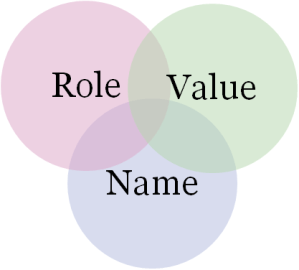
Here’s an example of where the role + name + value work together to create the screen reader text:

What is ARIA text?
First off, let’s talk about what that additional text is called. Where I work, we generally talk about this text as ARIA text. ARIA stands for Accessible Rich Internet Applications, which is a standard like HTML that we should ONLY USE WHEN HTML IS NOT ENOUGH. Because best practices state that you should use native HTML elements whenever possible and only use the ARIA elements if there is no other solution. (Why? It gives the most equal experience for users with disabilities and ARIA isn’t as simple as HTML.)
I hope that you don’t get the impression from that first paragraph that you should never supplement UX labels with ARIA text, because that would be impossible. ARIA is necessary to bridge the gaps that HTML doesn’t provide.
When to use ARIA text?
Use ARIA text when the information provided by the HTML isn’t good enough. Which happens a lot! Ask yourself these questions and if the answer is no, then you probably need ARIA text:
- Is there enough information for the text to stand alone?
- Are there any unsafe characters in the UX?
- Is information split between two separate strings?
- Does the link text inform the user what type of link is opening and what will happen when it opens?
- Is any information hidden by default (see more options at the end of a list)?
Stay tuned…
In my next postings, I’m going to go into detail for each of those questions. Let me know your thoughts or ask a question about accessibility.
Uncategorized a11y accessibility Section 508 WCAG web accessibility specialist

Andrea Fowler View All →
I’m a user experience writer (more than a UI copy writer) and content strategist in the Seattle area. I design help, training and support features for an IT admin tool. I also consider myself something of an accessibility expert – especially in writing screen reader text.
In my free time I love painting and hiding rocks around Whidbey Island, embroidery, cross stitch, Zen Tangling, and tie-dying. My other hobby is robotics and I’ve got a really cool Pi car. I’m a total geek: I collect Funkos and Playmobil, read hard science fiction and graphic novels. And I don’t ever want to hear you talk smack about Sam and Dean Winchester (Supernatural 4-ever!).
 Words are design
This is interesting. Thank you!
LikeLiked by 1 person